Beyond Online Forms:
How AI Form Builders Are Transforming Business Workflows
Most online forms do one thing: collect information.
A customer types a response, clicks submit, and sends the data into a spreadsheet or inbox. From there, someone on your team still has to review it, identify what matters, request missing information, forward it to the right person, prepare documents, and follow up.
The form may be digital, but the process surrounding it is often painfully manual.
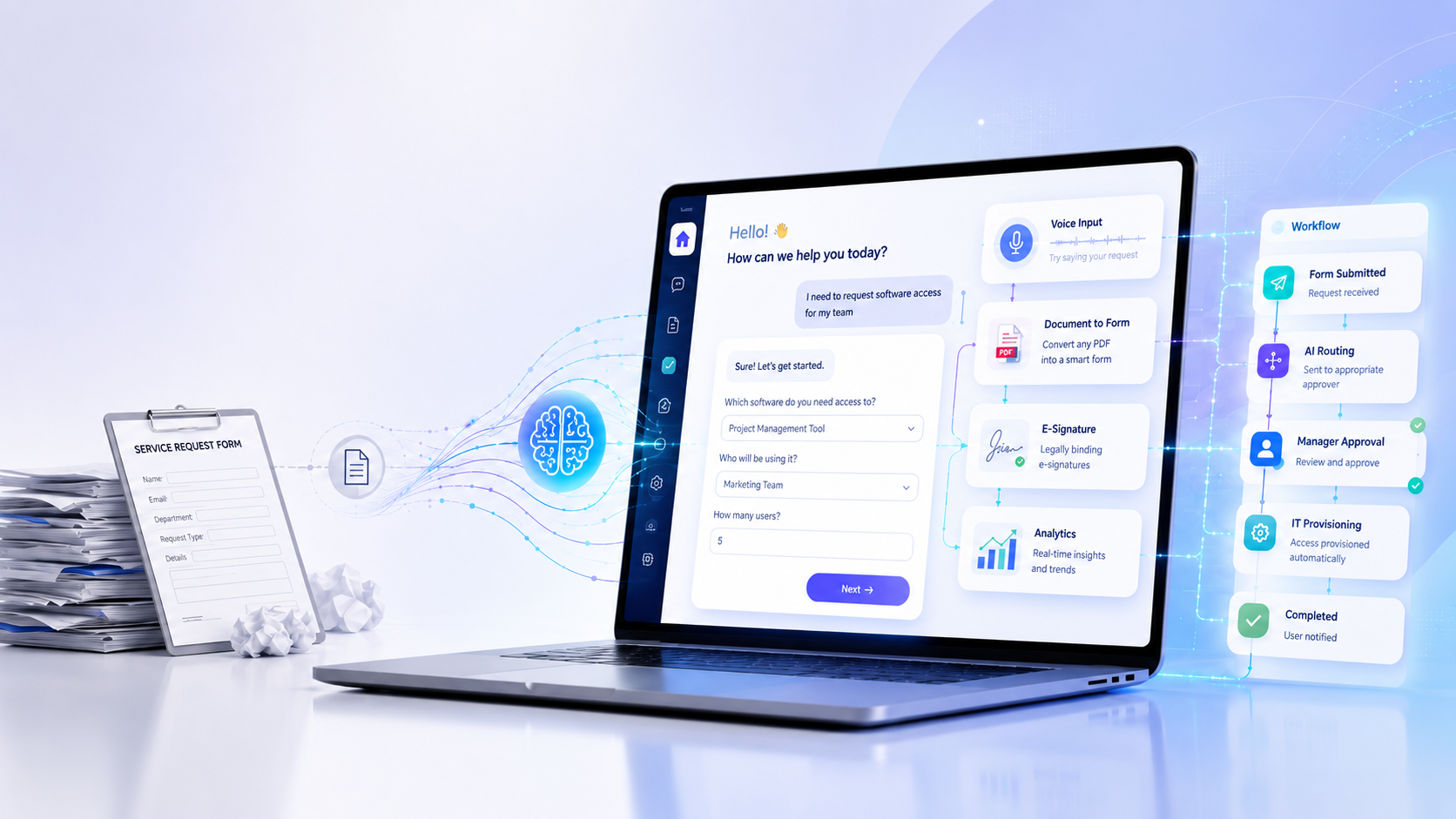
AI form builders are changing that. Instead of acting like static digital paperwork, they can guide users through questions, adapt to their answers, analyze submissions, trigger next steps, and help businesses manage an entire workflow from beginning to end.
Here is what that shift means—and how organizations can use intelligent forms to reduce administrative work while creating a better experience for customers, employees, and partners.
What Is an AI Form Builder?
An AI form builder is a platform that uses artificial intelligence to help create, complete, process, and analyze digital forms.
Traditional form builders require you to manually choose every field, write every question, configure each rule, and review every response. An AI-powered platform can simplify much of that work.
For example, you might type:
Create a new-client intake form for a residential cleaning company. Ask about the property, preferred services, pets, access instructions, scheduling, and special requests.
The AI can then turn that description into a structured form with relevant questions and field types.
The most capable AI form builders go further. They can also:
- Guide respondents through a form using voice
- Convert existing PDF documents into mobile-friendly forms
- Apply conditional logic based on previous answers
- Collect e-signatures
- Route submissions through approval steps
- Generate quizzes and certificates
- Summarize and visualize response data
- Send alerts, reminders, and follow-up forms automatically
This turns the form from a passive collection tool into an active part of your business operations.
Why Traditional Forms Create Friction
Online forms are more convenient than paper, but many still create unnecessary barriers.
They make users interpret the process alone
A person may not understand a question, know which option applies, or have the required information available. Without guidance, they may abandon the form or submit incomplete answers.
Long forms feel overwhelming
A page filled with dozens of fields can look like work before the user has even begun. This is particularly difficult on a mobile device.
The process stops after submission
Once an ordinary form is completed, the response often lands in an email inbox or spreadsheet. Someone must manually decide what happens next.
Important information becomes difficult to analyze
Collecting hundreds of submissions is easy. Finding trends, exceptions, urgent cases, and useful insights inside those submissions is much harder.
Existing documents remain trapped in PDF files
Many organizations rely on applications, waivers, disclosures, and intake packets created years ago. Rebuilding each document as an online form can be slow enough that teams continue emailing PDFs back and forth.
AI-powered forms address these problems by making the experience more conversational, adaptive, and automated.
Seven Ways AI Can Improve a Form Workflow
1. Build Complete Forms From a Simple Description
Creating a professional form usually involves several decisions:
- What questions should be included?
- Which field type should each question use?
- Which questions should be required?
- What instructions will users need?
- Should certain answers reveal additional questions?
- What happens after submission?
AI can produce a useful starting structure from a plain-language request. Instead of building every element manually, you describe the business outcome you need.
This is particularly valuable for teams that regularly create:
- Client intake forms
- Employee requests
- Vendor applications
- Customer surveys
- Inspection checklists
- Event registrations
- Consent forms
- Training assessments
Human review is still important, especially for legal, medical, financial, or regulated information. But AI can eliminate the blank-page problem and significantly accelerate the initial build.
2. Turn Form Completion Into a Guided Conversation
A static form asks users to read, interpret, and complete every field themselves.
A conversational form presents the process in smaller, more manageable steps. Voice AI can make the experience even more natural by speaking questions aloud and allowing respondents to provide answers conversationally.
This can help people who:
- Are completing the form on a phone
- Have difficulty reading lengthy instructions
- Prefer speaking to typing
- Need additional context before answering
- Are working while completing a checklist
- Speak a supported language more comfortably than English
The objective is not to add AI for novelty. It is to reduce the mental effort required to complete a process correctly.
A guided form can explain what information is needed, answer common questions, and move respondents through the experience one step at a time.
3. Convert Existing PDFs Into Mobile-Friendly Forms
Many businesses already have the documents they need. The problem is that those documents were created for printing rather than digital completion.
PDF applications and intake packets often require users to:
- Download the document
- Open it in compatible software
- Type or write their answers
- Save the completed copy
- Attach it to an email
- Wait for confirmation
That process creates friction for both the respondent and the business.
An AI-assisted PDF conversion tool can identify text fields, checkboxes, signature lines, and other document elements, then recreate them as an online experience.
The resulting form can be easier to complete on a phone, easier to validate, and easier to connect to an automated workflow.
Before publishing a converted document, the business should still verify every field, instruction, disclosure, and signature placement. AI accelerates conversion; it should not replace quality control.
4. Route Each Submission to the Right Next Step
Not every response should follow the same path.
Consider a vendor onboarding form:
- Low-risk vendors may proceed directly to standard approval.
- Vendors handling sensitive data may require a security review.
- Vendors exceeding a certain contract value may need executive approval.
- Incomplete submissions may need to be returned for correction.
- Approved vendors may need to receive tax and payment documents.
Conditional workflows make these paths possible without requiring a team member to manually forward every submission.
The form becomes the entrance to a structured process rather than an isolated data-collection page.
This can shorten response times, create accountability, and reduce the risk that important requests disappear inside a crowded inbox.
5. Collect Signatures Within the Same Experience
Signatures often create another break in the workflow.
A person completes a form, waits for a document, opens a separate signature platform, signs it, and sends it back. Each transition creates another opportunity for delay or abandonment.
Integrating e-signatures into the form workflow can keep the entire process connected.
Depending on the use case, organizations may need:
- A simple drawn signature
- A legally binding electronic signature
- Identity or email verification
- Timestamps
- An audit trail
- A completed PDF for each party
- Multiple signers in a specific order
Businesses should evaluate the legal and compliance requirements that apply to their documents. When implemented appropriately, integrated signatures can make agreements, approvals, waivers, and acknowledgments much easier to complete.
6. Ask Questions About Submission Data
Forms can generate valuable data, but only when teams can understand it.
Traditional analysis frequently requires someone to export responses, clean a spreadsheet, build formulas, and create charts. That process takes time and may prevent smaller teams from analyzing their information at all.
An AI analyst can let a user ask questions in ordinary language, such as:
- Which service was requested most often this month?
- How many applicants meet our minimum requirements?
- What are the most common customer complaints?
- Which locations received the lowest satisfaction scores?
- How do reported budgets differ by customer segment?
- Which submissions require immediate attention?
The system can then summarize responses or generate visualizations.
AI-generated analysis should be reviewed carefully, particularly when decisions affect people, finances, eligibility, healthcare, or compliance. Used responsibly, however, it can help teams move from collecting data to acting on it much faster.
7. Automate Follow-Ups With AI Workers
The most important work often begins after a form is submitted.
Someone may need to:
- Send a confirmation
- Alert a manager
- Request an additional document
- Assign a follow-up form
- Remind the respondent before a deadline
- Produce a daily summary
- Escalate a high-risk response
Rule-based AI workers can monitor submissions and perform defined actions when specific conditions are met.
For example:
When a new client selects “commercial property,” notify the commercial-services team and send the site-assessment form.
Or:
When an employee reports a safety incident, immediately alert the safety manager and create a follow-up task.
Successful automation depends on clear rules and appropriate guardrails. Teams should define exactly what the system can do, keep a record of its actions, and preserve human oversight for sensitive decisions.
Practical Use Cases for AI-Powered Forms
The technology can support almost any process that begins with collecting information.
Client intake
A guided intake form can answer common questions, collect relevant details, request signatures, and route each client to the appropriate service or team.
Employee onboarding
New hires can review narrated materials, complete required forms, take policy quizzes, sign acknowledgments, and receive certificates within one connected experience.
Vendor onboarding
Businesses can collect company information, tax documents, insurance details, security disclosures, and approvals without coordinating a long chain of emails.
Compliance training
Organizations can present policies or training materials, ask knowledge-check questions, apply passing-score requirements, and automatically issue certificates.
Service requests
Employees or customers can describe what they need, receive relevant follow-up questions, and have the request routed according to urgency, department, or request type.
Inspections and incident reports
Voice-guided forms can be useful when a respondent is moving through a facility, examining equipment, or documenting an event and cannot easily type long answers.
Customer feedback
AI can summarize open-ended comments, identify recurring themes, and help a business recognize issues that might be missed in a spreadsheet.
What to Look for in an AI Form Builder
Not every platform offers the same capabilities. Before selecting one, consider the full workflow rather than focusing only on form design.
Ease of creation
Can users create a form from a plain-language description? Can they still edit every field and rule manually?
Respondent experience
Does the form work well on mobile devices? Can it guide users one question at a time? Does it support voice or multiple languages?
Conditional logic
Can answers change which questions, documents, or workflow steps appear next?
Document conversion
Can the platform turn existing PDFs into online forms without forcing your team to rebuild everything?
Workflow automation
Can submissions trigger alerts, reminders, approval requests, follow-up forms, or scheduled summaries?
Data analysis
Can users explore response data without manually building a spreadsheet report?
Signatures and audit records
Does the signature method satisfy your business and legal requirements?
Security and privacy
How is data protected? What access controls are available? Does the platform support the regulatory obligations relevant to your organization?
Transparent pricing
Look beyond the monthly subscription. Some platforms limit forms, submissions, users, automation runs, or AI usage separately.
The right platform should reduce the number of disconnected tools involved in completing the process.
How to Create Your First Intelligent Form
A successful first project should be useful but manageable.
Step 1: Choose a repetitive process
Start with a form your organization uses frequently, such as client intake, a service request, vendor registration, or an internal approval.
Step 2: Define the desired outcome
Do not begin with fields. Begin with the final result.
Ask:
- What decision must be made?
- What information is required to make it?
- Who needs to review the submission?
- What should happen after approval or rejection?
- Which situations need special handling?
Step 3: Generate the initial form
Describe the process in clear language and let the AI create a starting structure.
Step 4: Review every question
Remove unnecessary fields, clarify confusing language, verify required disclosures, and make sure each question contributes to the outcome.
Step 5: Add logic and guidance
Show follow-up questions only when they are relevant. Add explanations where users might need help. Consider voice guidance for longer or more complicated processes.
Step 6: Configure the next steps
Define notifications, approvals, signatures, reminders, and follow-up documents before launching the form.
Step 7: Test realistic scenarios
Test complete, incomplete, unusual, and high-risk submissions. Review the experience on both desktop and mobile devices.
Step 8: Improve the workflow over time
Monitor where users abandon the process, which questions generate confusion, and which manual tasks remain. Then refine the form and automation rules.
The Future of Forms Is Not More Fields
Businesses do not need more places to collect information. They need better ways to turn information into action.
An intelligent form can create the right questions, guide respondents through them, convert existing documents, collect signatures, route approvals, analyze results, and trigger follow-up work.
That is a meaningful change in what a form can be.
Instead of asking people to navigate complicated paperwork, businesses can offer a guided conversation. Instead of sending every response into an inbox, they can connect it to a reliable workflow. Instead of allowing useful data to sit untouched, they can ask questions and uncover insights immediately.
FormJay is built around that idea: forms should not simply wait for people to fill them out. They should help move the work forward.
Ready to Build a Smarter Form?
Describe the process you want to create, let AI build the first version, and turn your next form into a guided, automated workflow.
Start building with FormJay for Free!